

Cordless Drill vs Impact Driver for Home Use
Table of Contents
- Cordless Drill vs Impact Driver for Home Use: The Short Answer
- How Each Tool Works: Rotational Force, Impact Mechanism, and Control
- Impact Driver vs Drill for Driving Screws: Torque, Speed, and Cam-Out
- How to Choose a Power Drill for Your Home Tool Kit
- Essential Power Tools for New Homeowners
- Maintenance, Battery Longevity, and Noise Levels
- Conclusion: Which Tool Belongs in Your Garage?
- Frequently Asked Questions
Last Updated: September 27, 2026
Cordless Drill vs Impact Driver for Home Use: The Short Answer
If you only buy one power tool this year, make it a cordless drill. The cordless drill vs impact driver for home use debate usually ends the same way: the drill handles drilling holes and lighter fastening, while an impact driver drives long screws faster with less wrist strain. For most homeowners, the drill comes first and the driver comes second.
Here's the practical split. A drill is the versatile tool: it bores holes into wood, drywall, and light metal, and it drives screws when you fit the right bit. An impact driver is the specialist: it hammers rotationally to sink long fasteners without stripping heads or fighting back.
This guide from Bills variety store breaks down how each tool works, when to reach for which, and what to look for if you're building a starter kit from scratch. The good news: you don't need to master torque curves or motor specs to choose well.
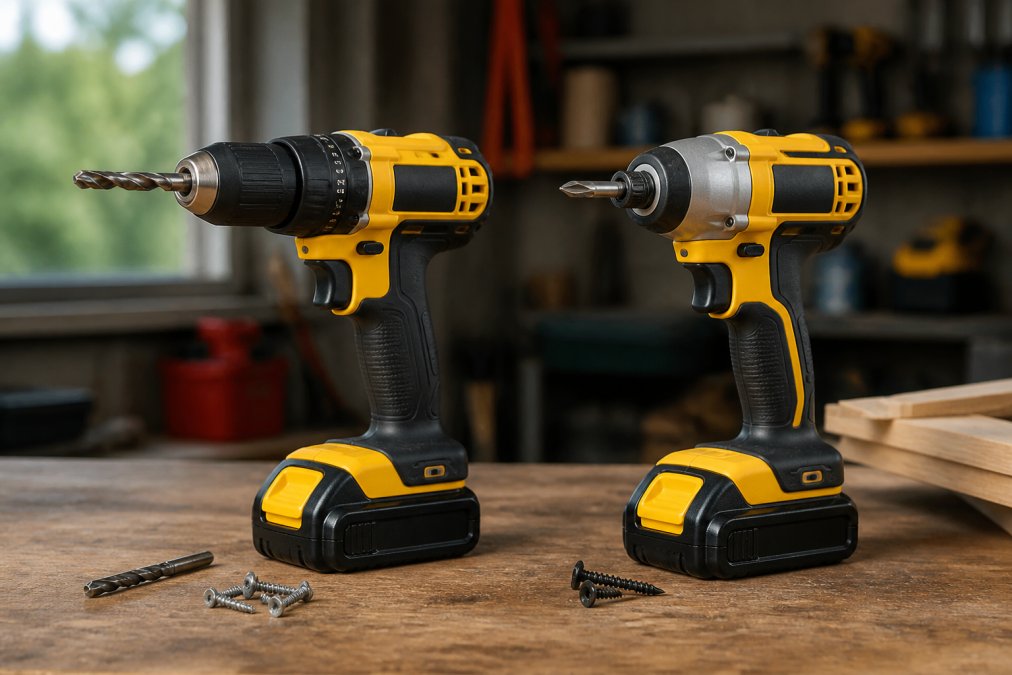
Quick Comparison: Drill vs Impact Driver
| Feature | Cordless Drill | Impact Driver |
|---|---|---|
| Primary job | Drilling holes, light fastening | Driving long screws fast |
| Chuck type | Keyless 3-jaw, holds round bits | Hex shank, 1/4-inch quick-change |
| Torque delivery | Smooth, controlled | Rotational blows |
| Best for | Pilot holes, mixed tasks | Deck screws, lag bolts |
| Learning curve | Low | Low, but more kickback |
| Noise level | Moderate | Louder under load |
The short version: a drill does more jobs, an impact driver does one job better.
How Each Tool Works: Rotational Force, Impact Mechanism, and Control
Both tools spin a bit, but they spin it differently, and understanding that difference is what stops you from buying the wrong one. A drill applies steady rotational force you control with a trigger and clutch. An impact driver adds a rapid hammering action to that rotation, which is what gives it so much driving power.
The Cordless Drill: Variable Speed Trigger and Clutch Settings
A cordless drill is a handheld power tool that rotates a bit to bore holes or drive fasteners, with speed controlled by how far you squeeze the trigger.
Two mechanisms do the work:
- The variable speed trigger lets you start slow and build up, which matters when you're setting a screw into soft wood or starting a hole without wandering. Squeeze lightly and the chuck turns slowly; squeeze fully and it spins at its top speed.
- The clutch is a ring of numbered settings behind the chuck. Each number sets a torque ceiling. When the screw reaches that resistance, the clutch slips instead of forcing the bit further, that's how you avoid overdriving a screw and stripping the hole. Higher numbers mean more torque before the clutch releases; the drill icon at the end of the ring locks the clutch out for full-power drilling.
For precision work, nothing else in the toolbox gives you that control.
The Impact Driver: Rotational Force and Impact Mechanism
An impact driver is a compact power tool that combines rotation with a hammering impact mechanism to drive screws and bolts with far more force than a drill.
Two consequences follow from that design:
- Torque is rated differently. Drill torque is a steady figure you can feather. Impact driver torque is a peak figure delivered in pulses, so the number on the box isn't directly comparable to a drill's.
- Control is coarser. The blows make it harder to feather the trigger for delicate work, and the tool kicks back rotationally when a fastener bottoms out. Pulsing the trigger, short squeezes rather than holding it down, is the standard workaround.
Impact Driver vs Drill for Driving Screws: Torque, Speed, and Cam-Out
For driving screws, the impact driver wins on speed and torque, but the drill wins on finesse. That's the whole trade-off in one line, but the useful question is which tool to grab for the job in front of you, and that depends on the screw, the material, and how often you'll repeat the motion.
A Project-Based Decision Framework
Most guides stop at "drill for holes, driver for screws." Here's how that plays out on the jobs a homeowner actually does:
| Home task | Reach for | Why |
|---|---|---|
| Assembling flat-pack furniture | Drill on a low clutch setting | Short screws, soft material, and you may need to back one out |
| Mounting a TV or heavy shelf | Drill for pilot holes, then drill or driver for lag bolts | Pilot holes prevent splitting; a driver sinks lag bolts faster |
| Hanging pictures and light brackets | Drill or a manual screwdriver | Small screws don't need impact power |
| Building a deck or fence | Impact driver | Hundreds of long screws, repetitive motion, speed matters |
| Driving screws into studs | Impact driver, pulsed | The impacts break friction the drill can't overcome |
| Drilling holes in wood or drywall | Drill | The chuck holds round bits; a driver can't |
| Mixing paint or driving a paddle | Drill | You need continuous rotation, not impacts |
| Occasional brick or concrete | Hammer drill | Neither a standard drill nor an impact driver is the right tool |
Practical Rules That Hold Up
- Use a drill for short screws, furniture assembly, and anything you might need to back out later.
- Use an impact driver for long screws, decking, and repetitive fastening where speed matters.
- Always match the bit to the screw head; a worn bit causes more cam-out than the wrong tool.
- Drill pilot holes in hardwood before driving, no matter which tool you use.
- For lag bolts and structural fasteners, check the manufacturer's torque spec, an impact driver can over-torque and snap a bolt if you lean on it.
How to Choose a Power Drill for Your Home Tool Kit
Start with voltage, then chuck, then weight. Those three specs decide whether a drill feels right in your hand and handles the jobs you actually have.
Chuck Size, Hex Shank, and Bit Retention
Chuck size and bit retention decide what the tool can hold. Most home drills use a 1/2-inch keyless chuck, which grips round drill bits and hex-shank accessories alike. Impact drivers skip the chuck entirely and use a 1/4-inch hex shank quick-release, so bits snap in and out in a second but round bits won't fit.
Essential Power Tools for New Homeowners
A drill and an impact driver cover most fastening, but a few companions round out a starter kit. Here's what most new homeowners actually reach for:
- Cordless drill for holes, anchors, and light assembly
- Impact driver for long screws and repetitive fastening
- Stud finder before you hang anything heavy
- Tape measure and level for anything that has to look straight
- Screwdriver and bit set for the jobs too small for power tools
- Safety glasses every time a tool spins
Maintenance, Battery Longevity, and Noise Levels
Battery care is where most home tools die early. Store packs at room temperature, avoid leaving them on the charger indefinitely, and run them down occasionally rather than topping off constantly. Extreme heat is the real killer, so don't leave a battery in a hot garage or a car trunk.
Conclusion: Which Tool Belongs in Your Garage?
Buy the drill first, add the impact driver when your projects demand it. That order solves the cordless drill vs impact driver for home use question for almost every homeowner, and it keeps your budget focused on the tool you'll actually use this weekend.
Frequently Asked Questions
Do I need both a cordless drill and an impact driver for basic home repairs?
For most homeowners, a cordless drill handles 80% of tasks: drilling holes, driving screws into wood, and light masonry with hammer action. An impact driver becomes worth adding once you tackle decking, framing, or long lag bolts. If your budget allows one tool first, start with a drill, then add an impact driver as your DIY projects grow.
When should I use an impact driver instead of a drill?
Reach for the impact driver when driving long screws, lag bolts, or working with dense material where a drill would stall or cam-out. Its impact mechanism delivers short rotational bursts that add driving power without twisting your wrist. For drilling holes, mixing paint, or precision work, the drill's variable speed trigger and clutch settings give you far more control.
Can I use my impact driver as a regular drill?
You can drive screws with an impact driver, but drilling holes is a different story. Impact drivers use a 1/4-inch hex shank, so you need hex-shank drill bits, and the lack of a clutch makes precision work difficult. For occasional pilot holes in softwood it works fine, but for masonry, large bits, or delicate fastening, a cordless drill is the better tool.
What should I look for when buying my first cordless drill?
Focus on three things: voltage (18V or 20V covers most home use), chuck size (1/2-inch keyless handles the widest range of bits), and battery platform. Stick with one brand's interchangeable batteries so future tools share the same packs. A brushless motor adds runtime and lifespan, which matters if you plan to use the drill regularly.